Showing posts with label apps. Show all posts

Wednesday, April 17, 2013

Please Don't Feed The Freeloaders

I haven't been to the zoo in a long time. I think the last time I went was in elementary school. However, I still remember a lesson I learned there. There was a sign posted in various locations that said "Please don't feed the animals." Since feeding the animals seemed like it would be fun, I know some people wonder about the reasoning behind the sign. It was explained to me that if everyone fed the animals, the animals would become lazy and stop going for any food other than the food that was handed to them by visitors at the zoo. They would become freeloaders.


When I was in Germany, I saw three bears that were in the center of a small city. They were sort of the pets of the entire city and any tourists that passed through. They performed tricks for everyone that was taking pictures and they were fed by city workers. I like to think that they connected performing with their meals, but maybe that's too optimistic of an expectation for bears.

Where am I going with this? I've been thinking about the sense of entitlement some people feel in today's society. When it comes to things that are free, I see three classes of people. I think the largest class feels that their mere existence entitles them to free entertainment. I'm probably going to tie this back into writing and reading, but feel free to extrapolate from there.

1. The Freeloaders

There is a class of people now that refuse to pay for apps, books, videos, or anything else to entertain themselves. Once you buy a tablet, everything you consume from then on should be free, right? Amazon is partially to blame for this type of mindset being acceptable (at least for books.) For the longest time, they encouraged authors to give away their works for free for short periods of time. Games were forced to go free as well. You see a lot of games that are free to play but you have to pay for "premium" content. These games are in a class known as "freemium." You can sometimes even get to where the premium subscribers are but it will take a considerable amount of time whereas they just had to shell out some cash to get to that point. Apps sometimes run a free version with advertisements and limited functionality to hook users and get them to buy the actual app for a few dollars. When it comes to content, the Wal-Mart method of making a $1 profit a million times instead of hoping for a one time million dollar purchase seems to be today's preferred method.

The freeloaders are a class of people that never pay for anything. They grab and horde free content like actual hoarders. They literally have thousands of hours of free content between their kindle free books, free apps, YouTube, Pandora, and everything else they've grabbed. They're like the animals in the zoo if visitors were allowed to feed them. Once they have a large amount of free content, they sometimes develop a very strange sense of self-importance. Since so many people hand out things for free, they must really want the opinion of a freeloader in order to validate that their content is good, right? So these freeloaders rate and review. They usually give things horrible ratings claiming that they "expected more," "would demand a full refund if it wasn't free," or "were looking for something different." They could probably identify these things as potential clashes with their personal taste if they read descriptions, looked at other reviews, and read up on the content provider beforehand. They don't do any of those things. They grab things that are free and then complain when it clashes with their very specific expectations. I imagine that they are gluttons in other areas of their lives as well.

Freeloaders like this really bother me. I've gotten reviews from people who admit they didn't bother to read anything I wrote but still feel justified leaving reviews. I've gotten reviews from people who downloaded the free sample and "wanted more." They wanted more for free, mind you, but that doesn't stop them from leaving poor reviews. Before you think this is just about me, let me remind you that on a good app, book, video, or whatever, the three ratings you will most likely see are 5 stars, 4 stars, and 1 star. That makes sense considering that most people won't review things that they don't feel strongly about one way or another but if you read through the 5s, 4s, and 1s, you'll see a lot of 1 star reviews from people who went into grabbing a free item without reading the description or reviews and found that it didn't match their specific tastes. That isn't the content creator's fault, it's the freeloader's fault. Descriptions, ratings, reviews, and Google are all there for a reason.

2. Half and Half

In the Philippines, there's a delicious dessert called a halo-halo. It's basically a mix of different fruits, jellos, ice, ice cream, etc. I think there is a group of people that are like that in a sense. They are looking for a good mixture of free and paid content. I have some e-books on my iPad that I paid for and some that I got for free (in my Kindle app, I don't use iBooks.) I've enjoyed books from both areas. When it comes to apps, I'm the same way. Some are great freebies and some are great paid apps. The half and half group is who I really want as my readers. I don't mind if they grab a free book from me every once in a while but I also hope they will pay for others if they enjoy the free one that they downloaded. A lot of authors and other content providers are banking on this strategy with freemium games and making the first book in a series free with the hope that readers will go on to purchase the rest in the series. It has worked incredibly well for some.

If I download a free app or book to sample it and see if I want the full version or another in the series, I don't leave poor ratings or reviews if I decide that it isn't my thing. When someone gives me a gift, it would be bad taste for me to tell them that their gift sucked. This seems to be where the half and halfs are very different from the freeloaders. They are searching for their own perfect mix but I think most of them realize that hard work went into whatever they are downloading (paid or free) and they treat it as a gift or a valued purchase. I don't hand out poor ratings if something isn't suited to my taste. The only time I would ever hand out a poor rating is if I felt someone was scamming their customers or if I vehemently disagree with the points they are making. I can't recall either of these things happening in quite a while.

3. The Truly Noble

These are the people that pay for everything they grab, even if they have the chance to get it for free. They have no problem whatsoever purchasing a book, app, video, song, etc. if they feel it will entertain them. I've met a few of these people who have specifically refused to download one of my books for free. They know it helps me out if they grab it when it's at full price and they wait until it is before they buy it. These people are rare... and they are also awesome. They truly understand the value of the work they are sampling and I think they have the greatest respect for the artists that bring them the apps they enjoy, the songs that help them rock out, the books that bring them to new worlds, and the videos that entertain them for hours.

Conclusion

You are alive and that's great. Your mere existence, however, doesn't really entitle you to much. Our nation's founders, borrowing an idea from Locke, decided that everyone has the natural rights of life, liberty, and the pursuit of happiness. I didn't see an endless stream of free content in that list. Those that work hard for their money understand that life is not a handout. Being an app writer, graphics artist, author, or content creator is a part-time (or full-time) job in many cases and not a hobby. Many of those who provide you with media and content passed on dozens of ideas before they produced whatever you are downloading. They spent hours putting it together. I think that should be in everyone's mind while they decide what it's actual value really is.

As always, feel free to comment and / or add your opinions in the comment section below and thanks for reading. (I'm also really glad that you can't rate blogs, because producing this much free content is still fun for me but I don't think it would be all that fun if people could give me 1 star ratings with comments like "I expected monkeys and your blog "History and Technology" had nothing to do with monkeys. Fail. 1 star." Enough ratings like that and most people would stop blogging.)

Wednesday, March 20, 2013

Apps I Enjoy for Apple and Android: Strategy Games

I get asked a lot from Geek Squad customers and others what some good apps are to get once you have a tablet or smartphone. When a lot of these people say "good apps" they mean "free apps." There are a lot of obvious candidates for amazing free apps like: Netflix (if you have a subscription), YouTube, Pandora, Kindle, etc. Instead of listing free apps, I'd like to give a list of some of my favorite paid apps. This post will feature strategy games that I picked up on sale that are great for wasting hours of your life in one sitting.

1. Kingdom Rush

Kingdom Rush is a tower defense game. Enemies (including goblins, trolls, spiders, the undead, etc.) are trying to make it to an end point and steal one or several of your twenty hearts (life.) Along their path, you can place various towers to slow them down and eventually kill them. Towers include a barracks (with three soldiers), archers, mages, and bombers. With each kill, you get an amount of gold that allows you to upgrade the towers. There's too many angles and aspects to explain it all here, so hopefully my basic information gets you a feel for the game. Here's some screenshots from their official website:


If you manage to beat a level without losing any hearts, it gives you a three star rating and then unlocks two additional modes to play the level over: Heroic and Iron Challenge. Heroic usually gives your towers a level cap and sends six super waves instead of twenty smaller ones and the Iron Challenge usually locks one or two tower types from even being built. Both Heroic and Iron Challenge give you one heart so you can't even let a single enemy through. Great for general-minded strategists (while I've beaten all the levels on normal, I'm still making my way through the Heroic and Iron Challenge modes.)

Pricing on this has ranged from free (only for a day or two) to $2.99. I picked it up for my iPad when it cracked the top 10 paid apps and was on sale for $0.99. I stopped playing after I beat the initial set of levels (including the Heroic and Iron Challenges) but then started playing again recently when an update brought some new levels and possible achievements. It's definitely worth a few bucks, as I've played this game for hours and never found it boring. I didn't find a legitimate version for Android (though it is available through third party app systems), but check it out in the Apple App Store:

iPad Version
iPhone Version

2. The Room

The Room is a straight-up puzzle game. You're locked in a room with a strange box. You have to solve small puzzles on the box in order to move in to the next level of the box. This game made me nostalgic since I grew up with puzzle-solving games like this (it's in the same vein as Myst, The 7th Guest, Connections, and The Last Express, though it's much shorter.) For most, it won't take more than a few hours to solve the entire puzzle box and make it to the center. Try to make it through without cheating; it's a lot more fun that way. It'll take longer to solve without Google but you'll feel better about yourself afterwards (I was tempted to cheat at a couple of points, but I eventually got through on my own.) Here's the YouTube trailer:


Since its release in September of 2012, The Room has sold more than one million copies. I don't think I got this when it was on sale, meaning I paid the full $1.99, but it was worth it. This is another one with no legitimate Android version yet, but you can check it out in the Apple App Store:

iPad Version
iPhone pocket Version

3. Summoner

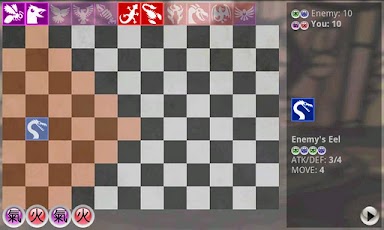
Since I've given you two Apple only games, I figured I'd give you one that's only for Android. Summoner is an amazing strategy-based game that, if I were to break it down to its simplest form, is like Magic: The Gathering on a chess board. I'll confess at this point that the programmer behind Summoner is my brother, but if I thought his game was shit... I would have told him (obviously in the nicest way possible) and I wouldn't be recommending it here. It's not. I promise.

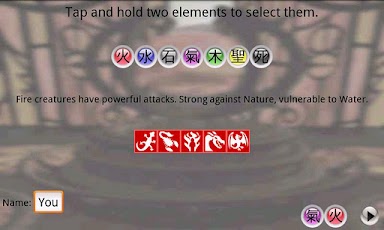
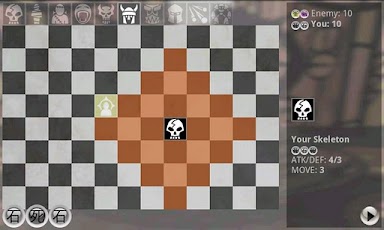
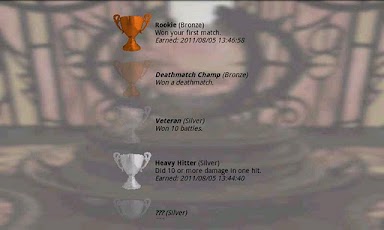
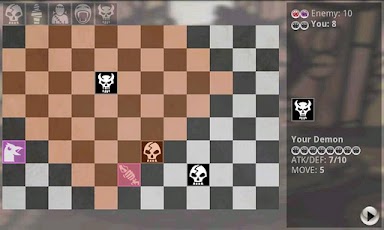
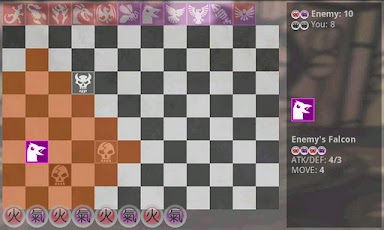
You begin by picking two elements and then gaining energy from those two elements each turn. You can use the energy to summon monsters from that element (or save up and summon monsters that require energy from BOTH elements.) Once you have monsters summoned, you use them to attack your opponent's monsters and then their life. There's a campaign mode with pre-set challenges or you can play against the computer. There's both a free and a paid version and I have the paid version on my Android smartphone. It got me hooked to the point that I wanted the full content. While I haven't played it in a while, it's a fun game that I sometimes pull up on my phone when I'm waiting for installations or downloads to finish and it's a good way to kill time. Here's some screenshots from Summoner:


If you think Summoner may be your type of game but you want to try it out first, download the free version. I'll give links to both versions below.

Summoner Free Version
Summoner Full Version

4. Plague Inc.

Here's an app you can get with either Apple or Android. Plague Inc. is a strategy-based game where you create a virus and then use it to kill the world. You choose what type of virus and then the country where it starts. It spreads and you indirectly guide and evolve it using DNA points that you earn over time. You can evolve symptoms, its lethality, its infectiousness, etc. Scientists will combat you by developing a cure. The more deadly your virus becomes, the harder they will work to end it. You complete each virus type and level by killing the billions of people alive in the world today. Here's the YouTube trailer:


I grabbed a copy of Plague Inc. when it started topping the charts of the Apple App Store at $0.99. It's still only $0.99 and definitely worth it. Links to different versions are below:

Android Version
iPad Version
iPhone Version

5. Plants vs. Zombies

My final recommended app for this post is Plants vs. Zombies and it's available for both Apple and Android devices. Plants vs. Zombies is a lot like Kingdom Rush in that you will have various types of zombies trying to make their way to the house across your yard and you act as... the gardener I guess?... and plant flowers and other plants that have seed-based attacks to stop them. You get energy to create plants by harnessing the sunlight (or there are plants you can create that spit out sunlight as well.) There are several different types of zombies that will attack. I got this on sale when it was a dollar or two off from the normal purchase price and, while it isn't my favorite app / game, it is still worth getting a copy if you haven't already. Here's some screenshots:


Plants vs. Zombies has had a few updates since I last played it so I might be looking into what they've added soon. For a comical strategy game, it's pretty solid. Links to the different versions are below:

Android Version
iPad Version
iPhone Version

So there you have it. 5 strategy-based games that I openly recommend to everyone who enjoys wasting hours of their lives. If you have anything to say about any of the above games, feel free to leave a comment below. I also wanted to add that everything stated above is my personal opinion and I don't get anything for recommending these apps. No one gives me a cut, so you can trust that I'm being honest here.

Thursday, November 1, 2012

A Review of Windows 8: Microsoft's Journey to Become Apple

In my capacity as an in-home computer technician, I came in contact with Windows 8 several months ago and I was able to explore it before it was launched. There are some things that I think are kind of cool, many changes that annoy me, some things that were completely deleted, and a few things that I liked. It's not really like any version of Windows that you've seen before (with the exception of Windows 7 when you enter desktop mode). All in all, I don't find Windows 8 to be a better solution for any piece of technology in my house, tablet or computer, and I think a decent amount of material was modeled after Apple products and ideas.


In explaining the benefits and detriments of switching to Windows 8, I will not have a computer with Windows 8 in front of me. I'm going completely from memory and I won't be looking anything up. If you want more of a technical analysis... last I checked... Google is still a thing. I won't be throwing any pictures at you either as I haven't taken any and I don't want to borrow screen shots from another source.

Home Screen

When you first boot Windows 8, you will be taken to a home screen with interactive tiles. It looks a lot like what you see on an Android or Apple tablet, with the exception that the tiles are more customizable and they constantly update whatever they represent (the Facebook tile will cycle through your news feed, Pictures will cycle through your pictures, etc.). I do kind of like the ease of being able to see updates to your Twitter, Facebook, Google+, and whatever else on these tiles, but I don't like the idea of the home screen being full of tiles. When I turn on a Windows computer, I expect it to boot me to a desktop. I have stuff on my desktop that gets me to where I need to go so the most the tiles have saved me is a few seconds. Windows 8 feels like a tablet OS and not a computer OS. My iPad boots to a screen that looks more like the Windows 8 home screen than my Windows 7 desktop or laptop. That's kind of sad. I'm not resisting change just for the sake of resisting change (as many of you know, I have a real weakness for adapting to new technology as soon as it's available) and I really think the home screen is a downgrade from a legitimate computer OS.

To be fair, the home screen has brought some cool new benefits. As I said earlier, your entire social media is available to you, live, right on the home screen. Tiles can also be moved, customized, organized, and the live updates can be turned on or off. Dumbing down to a tile home screen and several of the other changes made with this version of Windows also makes it a lot harder for viruses to infiltrate your system and troubleshooting software issues is a lot less complicated now (as far as I know right now, uninstalling and reinstalling is the only solid option as it's supposed to fix whatever problem you have).

Touch Screen

Windows 8 comes with built in touch screen gestures as Microsoft rightly decided that touch screen is starting to take over (another thing we started to see with Apple before everyone else jumped on board). Since Windows 8 leaves everything you have opened running, a swipe in from the left side allows you to cycle between applications. A swipe from the right side brings up the "charms" bar which has options to return to the home screen or to interact with whatever application / tool you are using. A swipe from top to bottom closes the current application (which is good to remember - I'll give them props for adding this gesture as I get really annoyed when an OS just keeps crap running in the background. I don't think big companies realize that 90% of their customers have no idea how to kill processes, tweak startup items, or close running applications).

Don't worry if you want to use Windows 8 with a mouse because you still can. Every touch gesture has an equivalent mouse click / swipe. I'm sure we will start to see a lot more PCs coming with touch screen though since Windows 8 is the first major OS I've dealt with that incorporates it fully (I mean specifically on computers).

Desktop

Yes, you can still get to a desktop. You have to hold down the Windows key and press D (Windows + D). The fact that there is now a Windows key on the keyboard that is used for shortcuts screams Apple (as Apple has a command key, a.k.a. an Apple key, used for shortcuts). To be fair, Microsoft has always had shortcut combinations that are similar to Apple's and who knows who came up with it first? Switching shortcuts from the control key to a Windows key just seems like a copycat move to me. I don't remember many of the Windows key shortcuts but you can find them if you're using a Windows 8 computer. Just hold down the Windows key, hit lettered keys, and see what each command does (one of them locks the screen, just be aware of that).

Again, a Windows OS that doesn't boot to a desktop bothers me. I know it's just a shortcut away, but I want a desktop to be what I see when I start a computer. I have an iPad (and it's the only Apple product in my house... don't think I'm a huge Apple fan because I'm not) and when I sit at my desktop computer, I'm looking to have a completely different experience.

Applications

Applications on the home screen are downloaded from the Windows store. Some are free, some cost money, it's basically just an app store. The cool thing is that Windows 8 does allow for integration with other Microsoft products like the XBox and some games will be available on both Windows 8 and XBox 360. Applications, once downloaded, can be downloaded up to 5x.

This is Microsoft's way of finally cashing in on apps. They've watched Google and Apple do it for years now and I guess they wanted their hand in the cookie jar as well. I do like the idea that you can download the app more than once as it is always a pain to deal with single license software on anything (tablet, computer, phone, whatever). They're behind though, programmers already have a lot of experience working with Google and Apple systems so I don't see a huge crowd of indie programmers moving to Windows 8. We'll obviously see the standard move of large companies supporting Windows 8 with apps early on (Skype, Netflix, YouTube, etc) but I wonder how far beyond that it will go.

SkyDrive / Accounts

So here's something I am actually excited for in Windows 8. Windows 8 accounts when attached to a Microsoft account will receive 7 GB of cloud storage. Kind of cool. There are two account types: local and Microsoft. Microsoft accounts have SkyDrive storage and you can sync all the apps and info from a Microsoft account between devices. Really cool. I like that if you have a Windows 8 PC, you can log in to that same home screen from a Windows 8 tablet. Local accounts only work on the device they are on but they can be upgraded later to Microsoft accounts.

The first account created on a Windows 8 PC will automatically be the admin. All accounts that follow are standard (though I seem to remember being able to upgrade them to admin but they are, by default, created as standard).

Application Integration

So another thing that I found pretty cool is the ability to sync between apps. If you're looking at some information in Internet Explorer or a picture or whatever that you want to share, you can bring up the charms. The charms bar will allow you to print, tweet, throw the info on Facebook, e-mail, etc. It brings up basically a social bar that gives you the option of doing whatever you want with it. Worth mentioning because it was a feature I consider to be uniquely Windows 8.

Removed Things and Changed Things

Some things have been modified or completely removed. Msconfig still works for the startup manager. Task manager gives you a LOT more information under the performance tab (that's ctrl + alt + del). Safe mode isn't an option via F8 anymore. The computer will boot into safe mode if it fails to boot twice (I think). I'm not 100% sure on this but I think Windows Media Player and the accompanying codecs have been completely removed. Also Windows 8 uses a UEFI instead of a BIOS and I'm pretty sure I don't want to try to explain what that means. If you care enough to want to know more, please google "BIOS vs. UEFI" or something like that.

All in all, I think there are a lot less diagnostic options which worries me. I really don't care if Windows 8 claims it's much more immune to viruses and problems... as a Geek Squad agent I would like the option to tweak, modify, and remove whatever the hell I want to. It's kind of disappointing to see a lot of my old diagnostic tools removed.

How do I learn more?

Are you about to be forced into Windows 8 or are you considering upgrading (you can upgrade from XP, Vista, or 7 if the computer meets the requirements)? Are you worried? Yes, Windows 8 does take a while to figure out. It didn't take me very long to get to what I wanted to because I try things until I find them. Too many people are scared of computers and are unwilling to give things a shot until they figure it out. If I end up with a misstep or an error, I backtrack or google whatever error I'm getting. I wasn't born with some technology gene that just integrates the computer with my DNA and lets me do whatever the hell I want like some people seem to believe. The best advice I can give you is don't fear Windows 8 and don't become so reliant on someone else that you never learn how to do anything. Computers don't come with self-destruct buttons that you might accidentally press. If you mess up, everything can be undone.

Conclusion

I couldn't put everything I know about Windows 8 in here because that would be boring and I think everyone should learn a little by exploring. What I wrote above is a basic overview that I hope presents enough information to let everyone feel basically familiar with it. I still think Windows 7 is the most functional OS for a computer to date and I won't be upgrading anything that is currently in my house to Windows 8. That beings said, Microsoft will be sending me a free copy of Windows 8 soon because I completed their Best Buy sponsored training. If I decide to frankenstein another computer together, I might put Windows 8 on it just to play around on a new OS.